
Every MailBack™ pixel is either Live or Off. This single switch controls whether the pixel is actively collecting leads.
-
Live — The pixel is active and collecting leads (within its schedule and budget).
-
Off — The pixel is not collecting leads. New pixels start here.
.png?width=400&height=275&name=mailback-pixel-hub-status-jul2026(1200px).png)
Going live
A newly created pixel starts Off so nothing is billed before you're ready. When your snippet is installed and you want to begin, open the pixel and click Go Live.
.png?width=670&height=194&name=mailback-go-live-pixel-dropdown-jul2026(1200px).png)
.png?width=339&height=202&name=mailback-go-live-pixel-confirmation-jul2026(1200px).png)
Turning a pixel off
Click Turn Off to stop collecting leads at any time. You can turn it back on whenever you like — your settings and existing leads are preserved.
.png?width=670&height=194&name=mailback-turn-off-pixel-dropdown-jul2026(1200px).png)
.png?width=388&height=229&name=mailback-turn-off-pixel-confirmation-jul2026(1200px).png)
Tip: Turning a pixel Off is the easiest way to pause spend without losing your configuration. To stop and start automatically on set dates, use Pixel Scheduling instead.
Pixel Verification Status
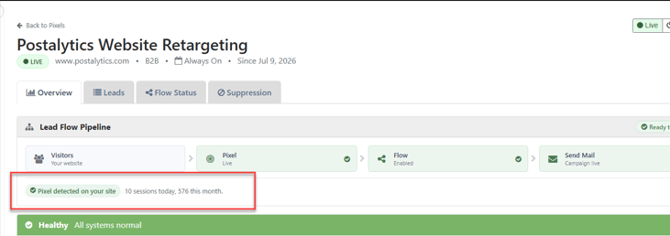
The dynamic Pixel Status Checker automatically verifies that your Postalytics Tracking Pixel is installed and firing correctly on your website.
Even after switching a campaign from Test to Live mode, improper installation or missing code can prevent your web tracking and trigger features from functioning. This tool continuously monitors your site and provides real-time feedback on your pixel's health.